If you’ve ever tried explaining a video idea to a group of colleagues, you know the pain.
You say, “It opens with a punchy product shot, then cuts to someone using it in a sleek office.”
Your colleague imagines a moody cinematic close-up. Your boss imagines an 80s advert from BBC2. Your video editor imagines a 3D animated model rotating in space.
Before you’ve even picked up a camera, everyone is making entirely different videos in their heads. It’s what humans do.
This is where a storyboard saves the day (and your sanity). It turns vague visual concepts into a clear, frame-by-frame plan that gets everyone on the same page long before you start spending money on filming or animation.
Here is your practical guide to creating a marketing video storyboard that actually works.
What Actually Is a Storyboard?
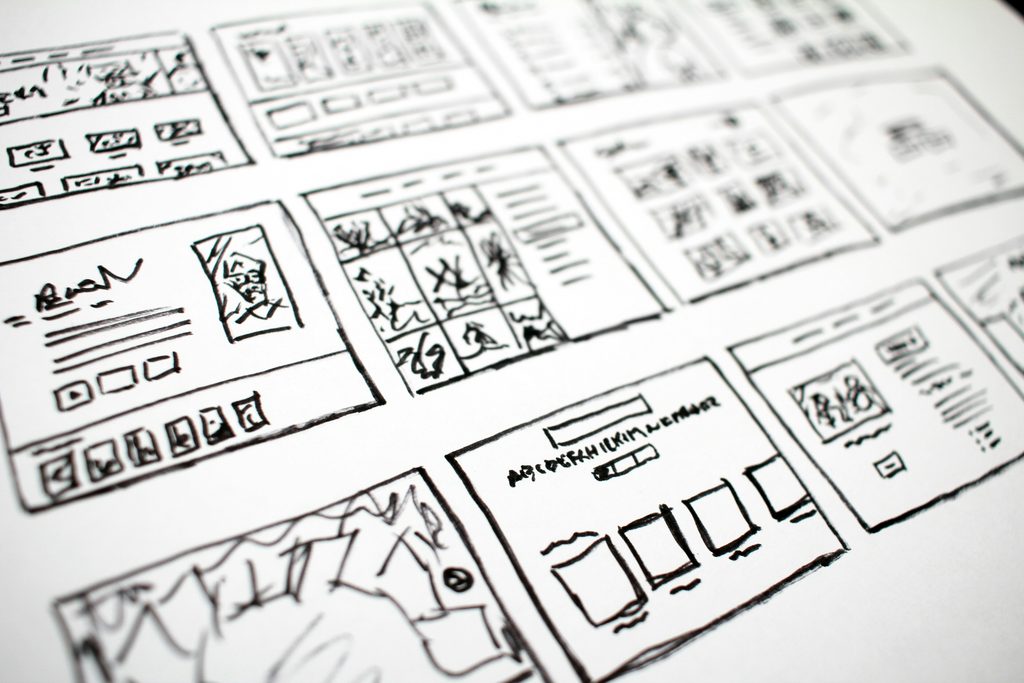
A storyboard is simply a visual comic book of your video.
It breaks down your script scene-by-scene or shot-by-shot, showing what the viewer will see and hear at every step.
You do not need to be a trained artist to make one. Stick figures, stock photos, mobile photos, or simple digital mockups work brilliantly. The goal isn’t to create high art – it’s to establish clarity.
The Big Three: Script vs. Storyboard vs. Shot List
It’s easy to mix these up, but they work together like a well-oiled machine:
| Tool | Primary Focus | What It Answers |
| The Script | The Words | “What are we saying or reading?” (Voiceover, dialogue, messaging) |
| The Storyboard | The Visual Flow | “What does this look like?” (Action, graphics, framing, style) |
| The Shot List | The Execution | “What do we need to film today?” (Camera angles, locations, props checklist) |
Does Every Video Need a Storyboard?
It’s a good question. The short answer: No.
If you are filming a simple, unscripted interview or recording a quick event recap, a full storyboard is probably overkill. A quick outline or shot list will do the trick.
However, a storyboard is a lifesaver if your video involves:
- Animation or motion graphics (where every second must be built from scratch).
- Scripted actors & set locations (where shooting out of sequence is required).
- Multiple stakeholders (who all need to approve the visual direction first).
- Paid ads or TV commercials (where timing is tight down to the exact frame).
What to Figure Out Before You Draw a Single Box
Before you start sketching scene ideas, make sure you have the foundations locked down – you’ll thank us later. Storyboarding cool shots without a clear goal leads to pretty videos that fail to convert.
You need to make sure you’re checking off these basics first:
- The goal: Are you raising brand awareness, driving direct sign-ups, or demonstrating a complex feature?
- The target platform: A vertical 9:16 video for Instagram Reels requires completely different visual framing to a 16:9 YouTube video.
- Brand guidelines: Are there strict brand colours, fonts, or logo placements you must stick to?
- The call to action (CTA): What should the viewer actually do at the end? (Hint: plan your final screen early, don’t slap it on as an afterthought!)
How to Build Your Storyboard in 5 Simple Steps
Step 1: Divide the Message into Logical Blocks
Don’t try to plan everything at once. Map out the classic marketing video structure first:
- The hook (0-5s): Capture attention immediately.
- The problem (5-15s): Highlight the viewer’s pain point.
- The solution (15-30s): Introduce your product or service.
- The benefits & proof (30-60s): Show key features or customer results.
- The call to action (Final 5s): Tell them what to do next.
Step 2: Set Up Your Grid
You don’t need fancy software. A Word document, Google Slides presentation, Canva layout, or a piece of paper with drawn boxes works perfectly.
Step 3: Add Your Visual References
In each box, place a visual representation of the shot. This can be:
- Quick stick-figure sketches.
- Reference images pulled from Pinterest or Google.
- Rough photos snapped on your mobile phone to test framing.
Step 4: Write in the Details Below Each Frame
Underneath every image frame, list:
- Audio: What is the voiceover or actor saying?
- On-screen text: Are there graphic pop-ups, titles, or subtitles?
- Action & notes: Camera movements (e.g., pan left, close-up on hands) or transition notes (fade to black).
Step 5: Review with Your Stakeholders
Pass the draft around for sign-off. It is 100x cheaper to change an idea on a piece of paper now than it is to re-shoot or re-animate a scene later because someone disliked the setting! And remember, only include stakeholders who need to be involved in the project.
Too many cooks… you know the rest.
Live Action vs Animation
For live action your storyboard acts as a roadmap for the shoot day. It helps you see how many locations you need and what props or actors need to be present.
For animation your storyboard must be much more precise. Since animators build everything from scratch, they need to know exact asset positions, colour palettes, screen text, and transition styles before they start working.
Common Storyboarding Mistakes to Avoid
- Designing before the message is clear: If the script keeps changing, stop drawing! Fix the words first.
- Cramming in too much: If a frame looks overcrowded or confusing, your final video will feel chaotic too. Simplify.
- Ignoring realistic budgets: It’s easy to draw a helicopter explosion in a storyboard – it’s much harder to pay for one on shoot day! Keep your visuals realistic to your budget.
What Happens Once Your Storyboard is Approved?
Once everyone gives the thumbs-up:
- Turn it into a shot list: Group shots by location or scene so you can film efficiently.
- Build a production schedule: Plan who needs to be where and at what time.
- Send to the Editor / Animator: They will use the storyboard as a reference blueprint when building the final cut.
Quick FAQs
What is a storyboard for a marketing video?
It is a frame-by-frame visual plan showing what viewers will see and hear throughout your video, helping teams align on ideas before production starts.
What software should I use to make a storyboard?
You don’t need specialist tools! Tools like Google Slides, Canva, PowerPoint, Milanote, or even paper and pencil work brilliantly.
How detailed does my storyboard need to be?
It depends on the complexity. Simple social videos only need rough sketch ideas, whereas high-end TV ads or animated explainers need precise details on timing, framing, and camera movement.
Fancy having a chat?
We have lots of experience developing storyboards for video projects and seeing them through right up until the very end. Fill out our online enquiry form to start the conversation with Open House Pictures.